
Multiplayer Browser Games With Voice Chat: Real CrazyGames Alternatives (2026)
Most CrazyGames alternatives lists just point you to another game library. If you want to play with friends and talk while you do it, here's what actually has voice chat built in.
Search for CrazyGames alternatives and you get Poki, Kongregate, itch.io, Playhop, GamePix — all fine sites, all answering a question you probably didn't ask. Those are library alternatives: somewhere else to find a game to play by yourself. If you landed here because you and three friends want to play the same thing at the same time and talk while you do it, the swap you need isn't another portal. It's a room.
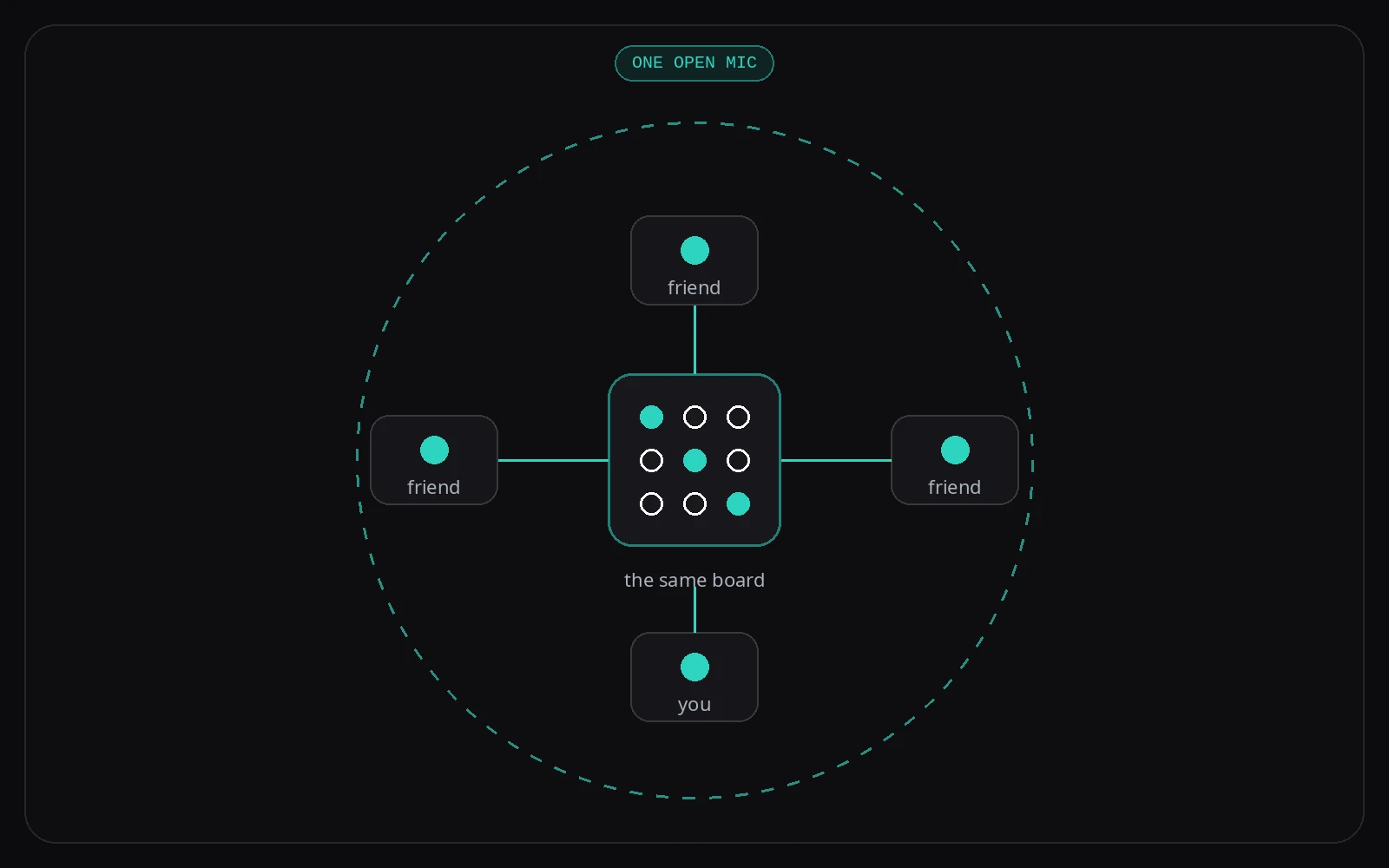
A game portal gives one person a game. A game room gives four people the same game plus a voice channel. The distinction is the whole article.
Jump to: Correction · Why People Look for Alternatives · The Four Honest Options · Comparison Table · Ad Cadence · Which One Should You Use · FAQ
Almost every comparison post says CrazyGames has no way to play with a specific friend. That's not true, and it's worth getting right. CrazyGames requires multiplayer games on its platform to support friend requests and friend joins, and its SDK exposes invite links and room data so a game can hand you a shareable link. If a post tells you otherwise, it hasn't read the docs.
The real gap is narrower and more useful to know: there's no platform-level voice chat. Text chat exists per game, at the developer's option, with mandatory moderation. Voice appears nowhere in CrazyGames' multiplayer requirements or SDK documentation.
Why People Look for CrazyGames Alternatives
Three reasons come up repeatedly, and only one of them is about the games.
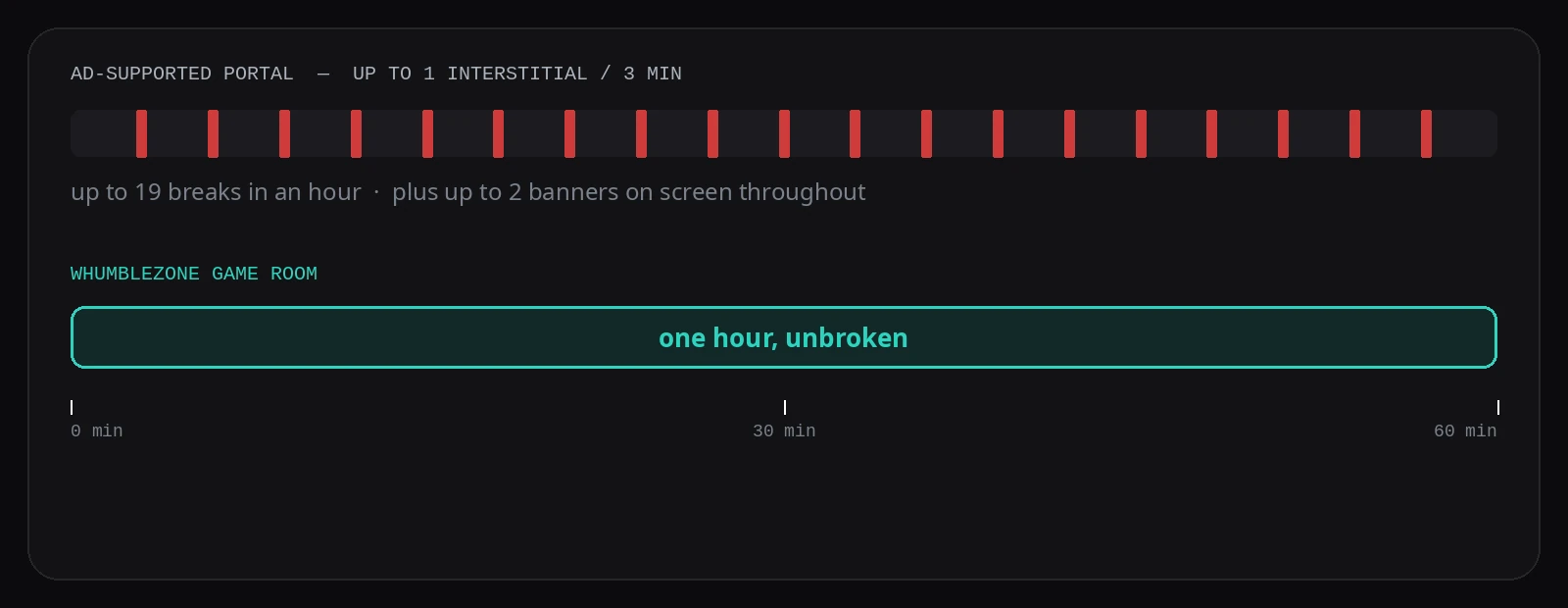
- Ad interruptions. CrazyGames runs platform-controlled interstitials at up to one every three minutes, plus a maximum of two banners on screen. Its rules do protect you — video ads can't interrupt active gameplay, and the game must pause and mute — but across an hour with friends, that's a lot of small stops.
- No voice. You end up running a second app for the talking, which means two tabs, two sets of permissions, and somebody always in the wrong one.
- Discovery fatigue. Around 4,500 titles by the company's own count, and a recurring user complaint that a lot of them are reskins of each other.
If your reason is the third one, stay where you are — a smaller site won't fix it. If your reason is the first two, keep reading.
The Four Honest Options
1. WhumbleZone game rooms
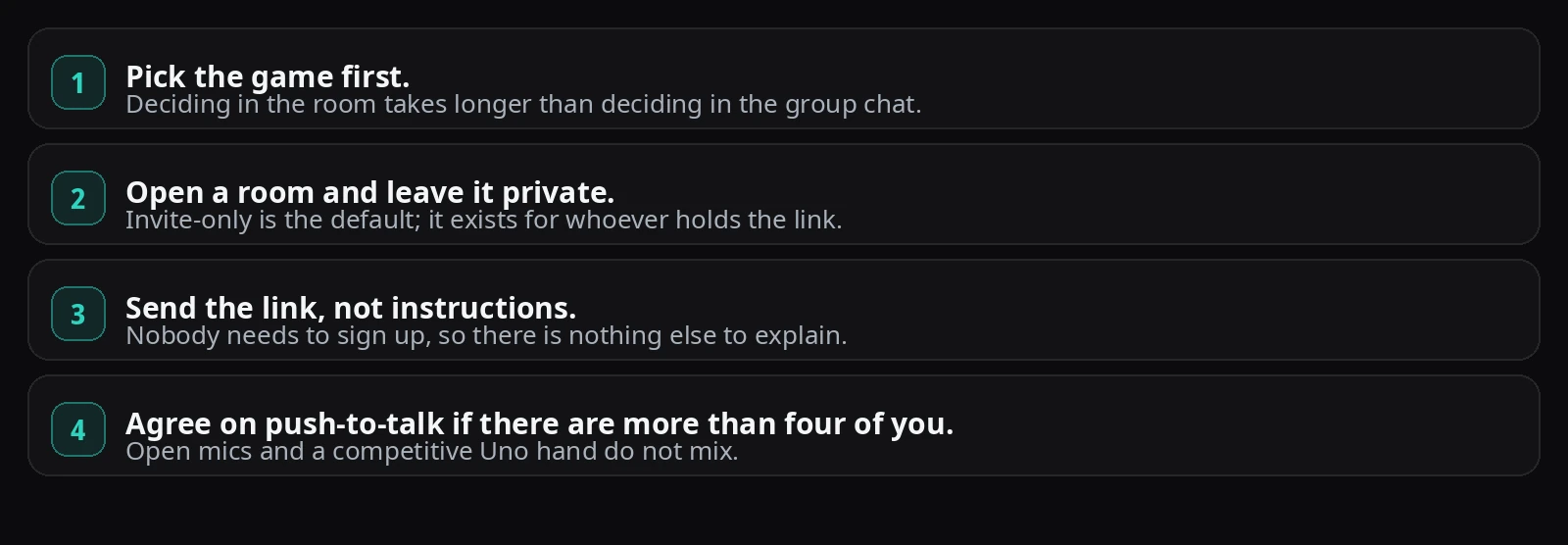
voice built inFive games, one room, everyone talking. You pick a game, get a link, and send it — whoever opens it is in, with no account step. Voice runs in the same tab as the board, so nobody is alt-tabbing between a game and a call.
The honest trade is obvious from that list: five games against several thousand. This is not a portal and does not try to be. It is the thing you open when the group already knows what it wants to play.
Game rooms → · voice rooms on their own
Start a Game Room on WhumbleZone →
2. CrazyGames, used the way most people do not
underratedGiven the correction above, this deserves to be option two rather than the thing you are leaving. If a CrazyGames multiplayer game implements invite links, you can send a friend straight into your room. Pair that with a voice call you already use and you have the large library and the talking.
It is two tabs instead of one. For some groups that is a non-issue, and the library difference is enormous.
You mostly play alone, or you want a specific title
Around 4,500 games, cross-device cloud saves tied to an account, leaderboards, and roughly 106 million monthly visits worth of people to match against. For solo play and for variety it is not a close contest, and a five-game room is not a replacement.
Come to a room when the group is fixed, the game is decided, and you want everyone on one mic.
3. Discord, if your group already lives there
voice yes, friction yesIf the four of you are in a server anyway, the voice half is solved. Discord voice channels hold up to 99 people, the browser client works without installing anything, and noise suppression runs in Chrome and Firefox.
Two caveats worth knowing before you route everyone there. Joining needs a Discord account — there is no account-free path in Discord's own end-user documentation. And the browser client is not the full client: screen-share audio is captured only on Chrome, Windows and macOS desktop, and mobile, and you cannot adjust stream quality in a browser at all.
You need a room that is still there tomorrow
A link-based room is ephemeral by design. A Discord server is persistent, permissioned, and already has your people in it. For a standing weekly thing, that is worth more than saving a signup.
4. The other portals — Poki, itch.io, Playhop, GamePix
no voice layerWorth naming because they are what everyone else recommends, and worth being blunt about: they are the same shape as CrazyGames. Large libraries, browser-based, ad-supported, no platform voice. Moving between them changes which games you scroll past, not how your group plays together.
Pick one of these if the library is your problem. None of them is the answer if voice is.
Quick Comparison
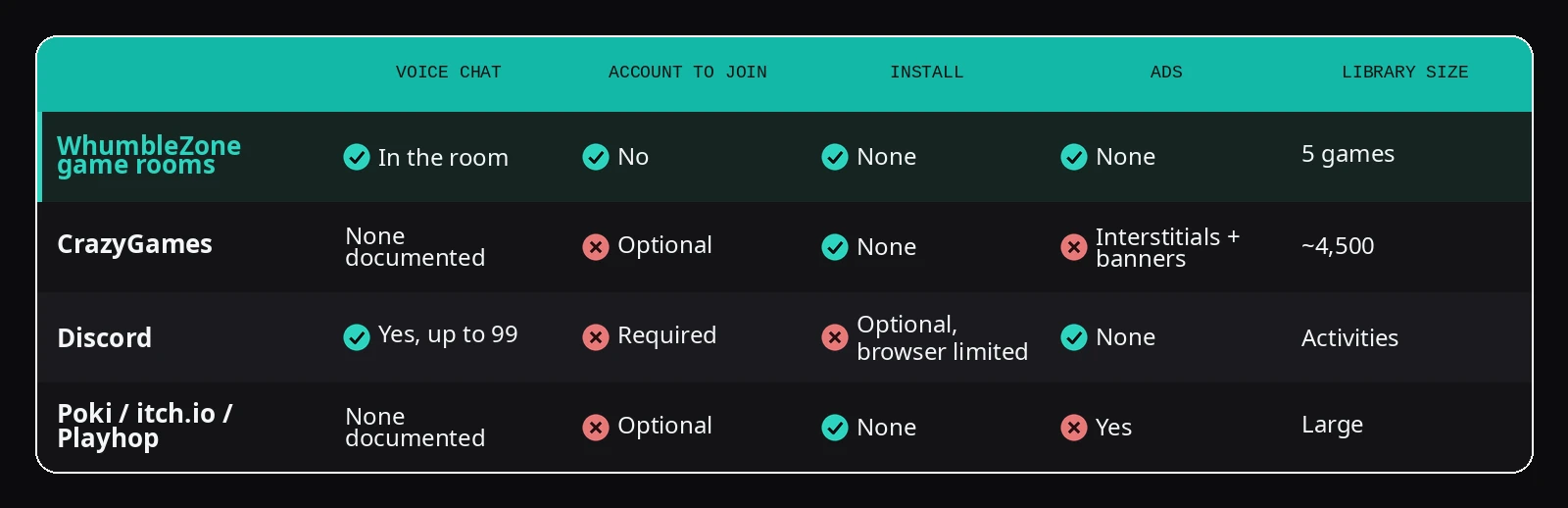
Library and ad details for CrazyGames come from its own developer documentation and homepage; Discord figures from Discord's developer and support docs. Sources are listed at the end. "None documented" means exactly that — no published feature, not a tested absence.
What the Ad Cadence Actually Looks Like
This is the difference people feel but rarely quantify. CrazyGames caps midgame ads at one every three minutes. Not constant — but over a one-hour session with friends, here is the shape of it.
Which One Should You Actually Use?
- You want to talk while you play, and the group is decided. A game room. That is the case it was built for.
- You want variety, or you are playing alone. CrazyGames, and it is not close.
- Your group is already in a server every evening. Discord voice plus whichever portal you like.
- You are on a phone and so is everyone else. Anything browser-based works; the room needs no install, which matters more on mobile.
How to Start a Game Room
Final Thoughts
The reason these lists all look the same is that they treat CrazyGames as a games problem. It is not. CrazyGames is extremely good at being a library, and if you only ever need a library you should keep using it — it has friend invites too, which most of the internet has not noticed.
What it does not have is a voice channel next to the board. That is a small-sounding gap that turns out to be the entire difference between playing a game near your friends and playing one with them.
What a Game Does When Someone Stops Responding
Arcade sites mostly pair you with strangers, so a player who vanishes is someone else's problem. In a room with friends it is your evening, so it matters what each game does when a turn goes unanswered. In WhumbleZone's turn-based games the server plays for the absent player:
- Connect Four drops a disc in a random non-full column after 30 seconds.
- Tic-Tac-Toe marks a random empty square after 30 seconds.
- Dots & Boxes draws a random undrawn line after 30 seconds.
- Chess plays a random legal move after 60 seconds.
- Carrom and Table Soccer simply pass the turn after 30 seconds, with no shot played for you.
The random fallback keeps a game moving, but it is not a helper. It will happily give away a piece or a winning square. If the person is gone for good, the game waits 30 seconds for them to reconnect before treating it as a permanent leave.
Frequently Asked Questions
Yes. CrazyGames requires multiplayer games on its platform to support friend requests and friend joins, and its SDK provides invite links and room data so games can share a direct join link. Whether a particular game exposes a copyable link is up to that game's developer.
Sources
- 1.CrazyGames' own developer documentation on multiplayer requirements — friend invites, room data, chat moderation. docs.crazygames.com/requirements/multiplayer, checked 17 September 2026.
- 2.CrazyGames' SDK documentation —
inviteLink,updateRoom, ad formats. docs.crazygames.com/sdk/game and docs.crazygames.com/sdk/html5, checked 17 September 2026. - 3.CrazyGames' ad requirements documentation — "max 1 every 3 minutes", banner limits. docs.crazygames.com/requirements/ads, checked 17 September 2026.
- 4.CrazyGames' SDK documentation on account data sync and cloud saves. docs.crazygames.com/sdk/data, checked 17 September 2026.
- 5.Game count (~4,500, company figure) from CrazyGames' own homepage, checked 17 September 2026.
- 6.Traffic estimate, 106M monthly visits, August 2026 — Similarweb's traffic report for crazygames.com.
- 7.Discord voice channel limit of 99 — Discord's own developer documentation, docs.discord.com/developers/resources/channel.
- 8.Discord browser limits on screen-share audio and stream quality — Discord's support article "Go Live and Screen Share".
- 9.Discord noise suppression in Chrome and Firefox — Discord's support article "Krisp FAQ".
All third-party details checked 17 September 2026. Features and pricing change — re-verify before relying on any figure here.
Related Guides
Ready to try it?
Create a free room in seconds — no account, no extension, no download.
Create a Free RoomRelated Articles
Voice Chat Without a Discord Account: What Actually Works
Discord wants an email, a username, a password, a date of birth and a CAPTCHA before you can talk to someone. Here's what the no-account alternatives are, and when to just use Discord anyway.
Gather Alternatives in 2026: the Free Tier Is Gone
Gather removed its free tier and repositioned as virtual-office software. Here's what actually replaces the free hangout space it used to be — and when Gather is still the right call.

Rave Alternatives 2026: Watch Together Without an App or Account
Rave asks for an app, an account, and a subscription per service. Here's the honest breakdown of browser-based Rave alternatives — and when Rave is still the better tool.